table of Content
- 1.How to Compare SEO Services in Austin Before You Hire an SEO Agency
- 2. SEO Agency in Austin That Offers True Local Search Results
- 3. Transparent SEO Services For Austin Businesses
- 4.Local Expertise Is What Separates Austin SEO Services
- 5. Additional Factors to Consider For Best Local SEO Services in Austin
- 6.Scorecard For Your Comparison to Choose the Best SEO Agency in Austin
- 7. Final Words: Now You Know What You Need to Ask in Discovery Call
- FAQs
Key Takeaways
- WordPress SEO services in Austin solve a specific problem: ranking drops that have no obvious cause because the issues compound with site age and get buried under hosting.
- The common mistake is adding more SEO plugins to fix ranking problems; most WordPress SEO issues are caused by too many plugins, not too few, and plugin consolidation lifts rankings more often than plugin addition.
- A credible WordPress SEO agency Austin businesses hire runs a technical audit scoped to the site’s actual age, consolidates the plugin stack, cleans the database, and monitors Core Web Vitals and crawl behavior for 90 days before measuring results.
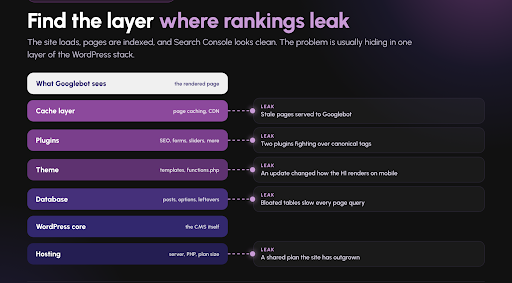
The site loads perfectly, pages are indexed, and Google Search Console shows no major errors. And yet rankings have slipped on priority queries, and the SEO team cannot explain why.
The reason is almost always inside WordPress itself. It could be a plugin conflict, a database table, a theme update that changed how the H1 renders on mobile, or a cache layer that is serving stale pages to Googlebot.
The point of WordPress SEO services in Austin is to find the specific layer where the ranking signal is leaking.
Rewriting the Question You Should Actually Ask
Most buyers walk into an SEO conversation asking, “What does this cost per month?”
That question has no useful answer. A $500 retainer that produces nothing is more expensive than a $4,000 retainer that produces 40 qualified leads a month.
The right opening question is:
“How many leads does this retainer need to produce for me to break even, and how long will that take?”
With this, you stop comparing retainer numbers across agencies and start comparing lead math.
What Is So Different About the Austin Market?
Austin is a WordPress-heavy market. WordPress remains the dominant CMS for US small and mid-sized service businesses according to W3Techs’ CMS market share data.
The result: most Austin service websites sit on WordPress, inherit WordPress-specific technical debt, and need a WordPress-literate team to diagnose issues that generic SEO agencies miss.
The specific issues depend on how old the site is. WordPress SEO problems compound with site age in predictable patterns. Here is what quietly breaks at each stage, what ranking symptom it produces, and how a credible WordPress SEO service in Austin fixes it.
Month 6 Problems: The Accumulation Starts With WordPress SEO services in Austin
What goes wrong:
- The site launched with 6 to 8 plugins. By Month 6, it has 14 to 20 because every small feature need got solved by adding one.
- The theme’s default SEO settings were never audited; the H1 structure, breadcrumb behavior, and canonical tags are inherited from the theme without review.
- Image uploads are being stored at full resolution with no compression.
- The default WordPress sitemap is active alongside a plugin-generated sitemap, producing duplicate submissions to Google Search Console.
Ranking symptoms:
- Mobile Core Web Vitals are passing but close to failure on LCP and INP.
- Occasional Coverage warnings in Google Search Console about duplicate pages.
- Rankings are holding but not improving despite consistent content publishing.
- The default WordPress sitemap is active alongside a plugin-generated sitemap, producing duplicate submissions to Google Search Console.
Year 1 Problems: Initial Technical Debt
What goes wrong:
- The plugin count is now 20 to 25. Three or four are plugins the business has not used in six months but has not deactivated.
- The theme has been updated 3 to 5 times; one of those updates changed how the site renders schema markup without anyone noticing.
- The database has 400 to 600 post revisions per published post, bloating the wp_posts table.
- One or two plugins have become abandoned and are now security risks and performance drags.
Ranking symptoms:
- Core Web Vitals have degraded from “Good” to “Needs improvement” or worse on priority pages.
- Schema markup appears inconsistent in Google’s Rich Results Test depending on the page.
- Rankings have drifted downward on queries that used to rank solidly.
- Google Business Profile integration is showing warnings.
Year 3 Problems: Plugin Bloat and Theme Deprecation
What goes wrong:
- Plugin count is now 28 to 40. Multiple plugins solve overlapping problems; at least two SEO-adjacent plugins are active simultaneously.
- The original theme has been deprecated or heavily modified; custom code is scattered across functions.php, child theme files, and page builder overrides.
- Database is now 500 MB to 2 GB. Query times on complex pages are measurable; mobile TTFB exceeds 800 ms.
- Redirect chains have accumulated from years of URL changes; some chains now have 3 to 5 hops.
- Legacy content accounts for 30 to 50% of all URLs but produces under 5% of organic traffic.
Ranking symptoms:
- Site-wide ranking decline across most priority queries.
- Google Search Console shows an increasing number of “Discovered but not indexed” URLs.
- Core Web Vitals are consistently poor on mobile; INP is the frequent failure point.
- New content takes 2 to 4 weeks to get indexed, when it used to take 2 to 4 days.
Year 5+ Problems: Legacy Accumulation WordPress SEO services in Austin
What goes wrong:
- Themes have left traces in the database. Dozens of plugins have come and gone, each leaving options, custom tables, or orphaned data.
- Chances are the database may go more than 4 GB, with significant portions being non-content data (session logs, old form submissions, deleted plugin leftovers, legacy analytics data).
- The site is on a shared hosting plan that was appropriate three years ago but no longer handles the traffic volume.
- URL structures have changed multiple times. Some ranking pages are now behind 2 or 3 redirect hops from their original authority-accumulating URLs.
- WordPress core, theme, and plugin update cycles have fallen behind by 6 to 12 months because nobody wants to break a fragile stack.
Ranking symptoms:
- Significant loss of organic visibility over 12 to 24 months despite no obvious single cause.
- AI Overview and featured snippet citations have declined sharply; the site no longer gets pulled into AI engine responses.
- Site crashes, 500 errors, and slow responses are now weekly events.
The DIY 60-Minute WordPress SEO Check
An Austin business can run this themselves in an hour before deciding whether a WordPress SEO agency in Austin is needed:
- Plugin Count: Dashboard >>Plugins. Over 20 active plugins deserve a consolidation conversation.
- Database Size: phpMyAdmin or hosting dashboard. Over 1 GB on a site with under 500 posts needs cleanup.
- Core Web Vitals: Run PageSpeed Insights on your top 5 traffic pages. Any “Needs improvement” or “Poor” mobile score is actionable.
- Plugin Freshness: Dashboard >> Plugins: look for “Last updated” dates. Any plugin not updated in 12+ months needs replacement.
- Image Library: Any single image over 500 KB is a compression opportunity.
- Sitemap Duplicates: Enter yoursite.com/sitemap.xml and yoursite.com/sitemap_index.xml. More than one working sitemap endpoint usually means duplicate submissions.
- Theme Health: Dashboard >> Appearance >> Themes. Deprecated or last-updated-18-months-ago themes deserve review.
- WordPress Core Version: Any version more than 6 months behind current is a security and SEO risk.
- Admin Bar on Frontend: Log out and check that the admin bar is not rendering for anonymous users; it loads extra assets even for logged-out visitors on some themes.
Any three or more of these flagged is enough reason to bring in WordPress technical SEO Austin help.
What Austin Specifics Matter in WordPress SEO Work
Three Austin signals belong in every WordPress technical SEO Austin engagement:
- Named Austin submarkets get submarket page priority.
- Austin-specific trust signals get preserved in schema.
- Austin seasonal content (SXSW adjacency, ACL weekend, UT academic calendar, Formula 1 weekend, hail season) gets technical priority in the cache and preload configuration so demand spikes do not break the site.
The Plugin Count on Your Site Right Now Is Trying to Tell You Something
Log into your WordPress dashboard. Navigate to Plugins. Read the number at the top of the list.
If it says 25 or more, the single highest-leverage SEO work on your Austin site is not more content, more backlinks, or more keywords.
The Austin WordPress sites that outrank their competitors in 2027 will not be the ones with the most plugins. They will be the ones with the leanest stack, the cleanest database, the maintained theme, and the technical audit that happens on schedule instead of after rankings have already dropped.
Frequently Asked Questions
How can an Austin business tell whether their ranking drop is a WordPress issue versus a content or backlink issue?
Run the 60-minute DIY check above. If three or more items flag, the WordPress stack is almost certainly contributing to the ranking problem. If none flag and rankings are still declining, the issue is more likely content freshness, competitor movement, or backlink loss.
Does adding another SEO plugin like Yoast, Rank Math, or All in One SEO fix WordPress ranking problems?
Usually no, and often it makes things worse. Running two SEO plugins simultaneously (one leftover from a prior setup, one newly added) is one of the most common hidden causes of ranking drops because they conflict on canonical tags, meta descriptions, and sitemap submissions. The fix is almost always consolidation to a single SEO plugin with properly configured settings, not addition of a second one.
How is WordPress SEO Austin work different from generic technical SEO?
Generic technical SEO looks at crawl structure, schema, redirects, and content signals without inspecting the CMS layer. WordPress technical SEO Austin work inspects the hosting, database, theme code, plugin interactions, and WordPress-specific rendering paths that generic audits miss. An Austin WordPress site with a 2 GB database, 35 active plugins, and a deprecated theme often ranks poorly for CMS-layer reasons that generic audits never surface, because those audits do not open the CMS.
How often should a WordPress SEO agency Austin businesses hire run a technical audit?
Full audits every 12 months; focused Core Web Vitals and plugin audits every 90 days; continuous monitoring on Google Search Console, uptime, and plugin updates. Sites older than 3 years benefit from quarterly full audits because the technical debt accumulates faster at that age. Sites younger than 1 year typically need a single thorough audit at launch and quarterly check-ins afterward.
Can an Austin business switch WordPress themes without losing SEO rankings?
Yes, with proper planning, theme switches that preserve URL structure, H1 patterns, schema markup implementation, image alt text, internal linking, and content density typically launch with under 10% short-term ranking fluctuation that recovers in 30 to 60 days.
How long does it take to see ranking recovery after WordPress SEO fixes?
Technical fixes affecting Core Web Vitals typically produce ranking movement within 30 to 60 days of implementation. Database and plugin cleanup effects compound over 60 to 120 days as crawl efficiency improves. Full stack rehabilitation on a Year 5+ site typically takes 6 to 9 months for complete ranking recovery, during which the site should also ship new content and earn fresh backlinks to accelerate the compounding.