table of Content
- 1.How to Compare SEO Services in Austin Before You Hire an SEO Agency
- 2. SEO Agency in Austin That Offers True Local Search Results
- 3. Transparent SEO Services For Austin Businesses
- 4.Local Expertise Is What Separates Austin SEO Services
- 5. Additional Factors to Consider For Best Local SEO Services in Austin
- 6.Scorecard For Your Comparison to Choose the Best SEO Agency in Austin
- 7. Final Words: Now You Know What You Need to Ask in Discovery Call
- FAQs
Key Takeaways
- WordPress SEO services in Phoenix fix ranking drops that get misdiagnosed as content issues.
- The biggest lever is symptom-driven technical diagnosis; different ranking symptoms point to different WordPress causes, and treating every drop as a content problem wastes 60 to 90 days of SEO work.
- A credible WordPress SEO agency Phoenix businesses hire runs a symptom-specific technical audit first, confirming the technical layer is clean.
Phoenix WordPress sites lose rankings every month for technical reasons that look like content problems.
The marketing team reads the ranking drop, assumes the content is stale, and rewrites the top 10 pages.
WordPress SEO services flip that sequence. It first rules out the technical suspects, confirms the WordPress stack is clean, and only then decides whether content is actually the problem.
Here is the symptom-by-symptom technical checklist a WordPress SEO Phoenix provider should run before anyone rewrites a single paragraph.
Rankings Dropped on Previously Ranking Pages
Stale content. A page that ranked solidly for 18 months and dropped 15 positions in one month almost never dropped because the content aged. Content ages slowly. Technical regressions happen suddenly; that is why availing WordPress SEO service in Phoenix becomes a necessity.
What to check first, in order:
- Canonical Tag Conflicts: Open the page and inspect its canonical URL. Then check whether a second canonical is being added by another plugin, a theme, or an inline script. Two canonical tags on one page confuse Google and often trigger a ranking drop.
- Schema Markup Breaks: Run the page through Google’s Rich Results Test. If LocalBusiness, Service, FAQPage, Article, or Review schema is no longer validating, a recent plugin update broke the implementation.
- Index Coverage Changes: Open Google Search Console and inspect the specific URL. If the status changed from “Indexed” to “Discovered but not indexed.”
- internal Link Loss: Compare the current internal linking structure to what it was before the drop. If the page lost inbound internal links, its topical authority signal degraded.
- Core Web Vitals Regression: Run the page through PageSpeed Insights. If mobile LCP, INP, or CLS degraded in the last 30 to 60 days, a recent change affected rendering. If all five checks are clean, then evaluate the content. Usually one of the five is the real cause.
New Content Takes Weeks To Get Indexed
Phoenix businesses that used to see new posts indexed within 2 to 7 days now see 3 to 6 weeks. They are hitting a WordPress-layer crawl budget problem.
What to check first, in order:
- Sitemap Health: Open the XML sitemap and confirm it is current, includes the new URLs, and is submitted to Google Search Console. If two sitemaps exist, deactivate the duplicate. Also confirm the sitemap is not over 50,000 URLs or 50 MB per Google’s sitemap limits documentation.
- Crawl Budget Bloat: If the site has thousands of parameter URLs, tag archive URLs, author archive URLs, or paginated URLs that have no SEO value, Google is wasting crawl budget on them instead of new content.
- Discovered But Not Indexed Status. Google Search Console will list specific URLs with this status. It means Google saw the URL but decided not to crawl it, usually because the site has too many low-value URLs relative to its authority.
- Internal linking to new content. New posts should be linked from at least 2 relevant existing pages at the time of publication. If new content is orphaned (no inbound internal links), Google has no path to discover it.
- Google Business Profile signal. For businesses in Phoenix, local SEO services matter significantly. GBP activity sends freshness signals that correlate with faster content indexing.
Mobile Optimized WordPress Technical SEO Phoenix
Mobile-specific drops are almost always technical because desktop rankings continue to hold. Content that fails on mobile but works on desktop is rare; technical mobile rendering problems are common.
What to check first, in order:
- Mobile Core Web Vitals: Specifically INP (Interaction to Next Paint) and LCP. Phoenix mobile users on 4G and 5G should see sub-2.5-second LCP; anything over 4 seconds triggers measurable ranking drops.
- Mobile Usability Errors in Google Search Console: Open the Mobile Usability report. Common Phoenix WordPress errors: clickable elements too close together, text too small to read, content wider than the screen.
- AMP Legacy Issues: Phoenix sites that enabled AMP years ago and then disabled it often have orphaned AMP URLs still in Google’s index. Those URLs now return 404s or redirect incorrectly.
- Responsive Theme Breakage: Test the site on 5 different mobile devices or in Chrome’s device emulator.
- Mobile-specific redirects: Sites that used to serve a separate m. subdomain to mobile users sometimes have leftover redirect rules sending mobile traffic to deprecated URLs.
Rankings Fluctuate Wildly Week To Week
Weekly ranking volatility that persists over 60 to 90 days is almost always technical.
What to check first, in order:
- Cache Misconfigurations: If the cache plugin is serving stale pages to Googlebot while serving fresh pages to users, Google sees a different site than visitors do.
- Server Intermittent Errors: Check server logs for 500 errors, 503 errors, or timeout patterns. If Googlebot hits errors even 2 to 5% of its crawl attempts, rankings fluctuate as Google reassesses the site’s reliability.
- Hosting-Level Resource Caps: Shared hosting plans often throttle resources when a site exceeds its allocation, which produces intermittent slowness that affects both user experience and crawl success.
- Plugin Update Cycles: If plugins are auto-updating without staging testing, each update can introduce temporary regressions that affect rankings for 3 to 10 days.
Core Web Vitals Failing Despite Good Content
- Image optimization: Phoenix WordPress sites with hero images over 300 KB on mobile consistently fail LCP.
- Third-Party Scripts: Phoenix service businesses often load chat plugins, call tracking scripts, review widgets, and analytics tools that collectively add 1 to 3 seconds to LCP.
- Theme Bloat: Some Phoenix WordPress themes load their entire CSS and JavaScript library on every page, even when the page uses only 10% of the theme’s features.
- Database query slowness. Pages that make 100+ database queries per load will fail INP on mobile.
- Font loading strategy. Phoenix sites loading 4 to 6 Google Fonts synchronously add 200 to 500 ms to LCP.
When It Is Actually the Content and Not the Technical Fixes From the WordPress SEO Services in Phoenix
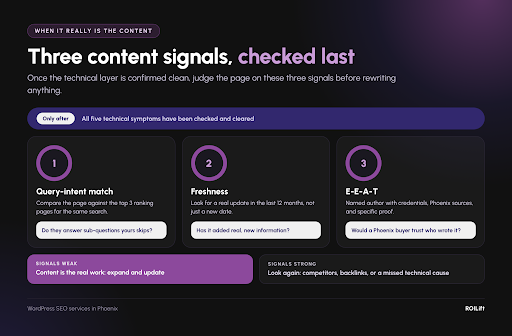
After all technical checks across the symptoms, if the technical stack is clean, it’s time to evaluate content. The three content signals that matter in Phoenix after technical is confirmed clean:
- Query-Intent Match: Does the page actually answer the specific question Phoenix buyers search? Compare the page’s content against the top 3 ranking competitors; if the competitors address specific sub-questions that your page does not, content expansion is justified.
- Freshness Signals: Identify whether the page has been updated in the last 12 months with real new information, not just a date change. Content writing services that bestow seasonal context specifically reward content.
- E-E-A-T Signals: Does the page name the author with real credentials, link to Phoenix-credible sources, and include specific proof points (named Phoenix submarkets served, specific case studies, real review numbers)?
If all three content signals are weak after the technical layer is optimized, content is the real work. If any of them are strong and the technical layer is clean, something else might be the cause.
What If Both Technical and Content Aspects Seem to Be Perfect?
In the case where you are unable to identify what’s causing the sudden drop in the ranking, it’s time to hunt for the perfect all-around SEO services in Phoenix.
First, a free SEO audit runs a scoped version of the 25 checks against your site and shows you which symptom you actually have and which 3 technical causes are most likely.
The audit maps the actual ranking symptom to the likely causes above, works through the protocols, and only recommends content work after the technical layer is verified clean.
ROILift runs every WordPress SEO services in Phoenix engagement starting with a symptom-specific technical audit. By the time the engagement produces a recommended action plan, the actual cause is named with evidence, not guessed.
Frequently Asked Questions
How do I tell if my Phoenix WordPress ranking drop is technical or content?
Content issues produce slow declines over 60 to 180 days as content ages relative to competitors. Technical issues produce faster drops (within 14 to 30 days). If you can name a specific event in the 30 days before rankings dropped, the technical layer is probably involved.
Why do Phoenix WordPress sites accumulate technical debt faster than sites in other metros?
Phoenix has a dense market of local web agencies, which produces a pattern where businesses get rebuilt every 3 to 5 years as they rotate. Technical debt layered across 2 or 3 agency handoffs is common in Phoenix WordPress sites, and generic SEO audits do not surface it because they do not inspect the CMS layer.
Should I consolidate plugins before rewriting content on my Phoenix WordPress site?
Yes, almost always. Plugin consolidation produces faster ranking lift than content rewriting on sites. Because the consolidation addresses Core Web Vitals and crawl efficiency issues that content rewriting cannot touch. The right sequence is technical audit first, plugin consolidation and database cleanup second, Core Web Vitals optimization third, and content refresh fourth. Jumping to content refresh first is where most Phoenix SEO budgets get wasted.
How often should a Phoenix WordPress site run a technical audit?
Quarterly for sites under 3 years old; every 60 days for sites over 3 years old or with 25+ plugins. Phoenix seasonal cycles (monsoon, pool season, Spring Training, winter visitor) also create specific audit windows. A technical audit in May prepares the site for monsoon-season roofing and HVAC query spikes, and a November audit prepares for winter visitor demand in hospitality and retail categories.
What is the difference between WordPress SEO Phoenix work and generic SEO services?
Generic SEO services focus on content, keywords, and backlinks. WordPress SEO services in Phoenix also inspect the CMS layer: plugins, theme code, database health, hosting configuration, caching behavior, WordPress-specific schema implementation, and CMS-level crawl patterns. An Austin or LA WordPress site faces similar issues, but Phoenix-specific signals shape the audit priorities.
Can I run the technical diagnostic in-house without a WordPress SEO agency Phoenix businesses hire?
Yes, with roughly 6 to 10 hours of technical time with Google Search Console, Google’s Rich Results Test, PageSpeed Insights, and WordPress admin tools. Most businesses outsource because the hours compound against higher-value work, and because diagnosing which of the5 symptoms you have and which of the checks to prioritize requires experience with hundreds of WordPress sites. In-house diagnosis typically identifies 60 to 70% of issues; experienced providers typically find the remaining.