table of Content
- 1.How to Compare SEO Services in Austin Before You Hire an SEO Agency
- 2. SEO Agency in Austin That Offers True Local Search Results
- 3. Transparent SEO Services For Austin Businesses
- 4.Local Expertise Is What Separates Austin SEO Services
- 5. Additional Factors to Consider For Best Local SEO Services in Austin
- 6.Scorecard For Your Comparison to Choose the Best SEO Agency in Austin
- 7. Final Words: Now You Know What You Need to Ask in Discovery Call
- FAQs
If you run Google Ads in Phoenix and feel like your budget disappears faster than the leads come in, welcome to the reality of paid ads.
A big part of that budget is being spent on searches that have nothing to do with your service. Someone types “how to fix my AC capacitor” into Google. Your HVAC ad shows up.
The good news: the irrelevant searches that drain Phoenix Google Ads accounts follow 6 predictable patterns, and all 6 can be blocked with a few hours of negative keyword work.
Where Phoenix Google Ads Management in Phoenix Are Quietly Being Wasted?
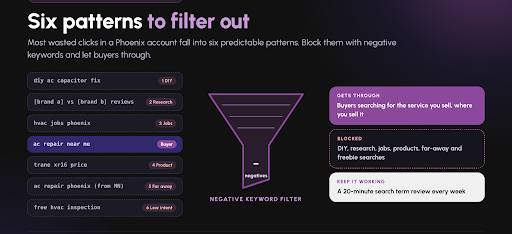
The point of disciplined Google Ads management in Phoenix is to recognize these patterns, block them systematically, and keep blocking the new ones that appear every week.
Google Ads Help documentation on search term reports and negative keywords confirms that irrelevant searches are a normal byproduct of broad and phrase match keywords, and that steady negative keyword work is the only reliable fix.
Here are the 6 patterns, the Phoenix context behind each, the negative keywords to block them, and the typical monthly spend recovery per pattern.
Pattern 1: The DIY and How-To Pattern
What it looks like:
“How to fix my pool pump,” “DIY AC capacitor replacement,” “how do I unclog my own drain,” “video tutorial roof patch Phoenix.”
Why Phoenix accounts get hit?
Monsoon season (June through September) triggers DIY roofing and water damage research.
Pool season (March through May) triggers DIY pool equipment research.
Summer peak triggers DIY HVAC troubleshooting. Phoenix buyers specifically research self-help options before calling a pro because of the climate pressure and the sense that service providers are backed up.
Negative keywords to add:
How to, DIY, do it yourself, tutorial, video, yourself, myself, diagram, instructions, guide to, step by step, troubleshoot, repair manual, YouTube, Reddit, forum.
Pattern 2: The Research and Comparison Pattern
What it looks like:
“Best plumber in Phoenix reviews,” “top rated HVAC companies Scottsdale comparison,” “AC repair Phoenix cost estimate,” “which Phoenix dentist is cheapest.”
Why Phoenix accounts get hit?
Phoenix buyers are comparison-heavy because of the metro’s dense service provider base. These searches are not necessarily bad; some lead to real conversions.
The problem is when the ads show up on pure research queries that will click through 5 competitors before deciding, running up your click costs without producing proportional leads.
Negative keywords to add (carefully):
This is the trickiest pattern because some comparison searches do convert. Add selectively: “review” (as a standalone), “reviews of,” “versus,” “vs,” “compared to,” “ratings for,” plus any direct competitor names you do not want to pay to show against.
Pattern 3: The Job Seeker Pattern
What it looks like:
“HVAC jobs Phoenix,” “Scottsdale dental assistant hiring,” “plumbing careers Mesa,” “AC technician salary Arizona.”
Why Phoenix accounts get hit?
Phoenix’s strong trades and healthcare employment produces constant job-search activity, and job seekers often click service pages while researching who the employers in the area are.
Phoenix accounts in HVAC SEO or other generic niches consistently see 5 to 15 percent of clicks come from job-related searches when job terms are not blocked.
Negative keywords to add:
Jobs, hiring, career, careers, salary, pay, wage, employment, employer, how much do they make, apprentice, apprenticeship, job openings, job description, resume, interview, work for.
Pattern 4: The Product and Brand Pattern
What it looks like:
“Trane XR16 Phoenix price,” “Carrier Infinity 26 Scottsdale,” “where to buy AO Smith water heater Mesa,” “Benjamin Moore paint Chandler.”
Why Phoenix accounts get hit?
Phoenix buyers often start with product research before deciding to hire a professional. A homeowner searching “Trane XR16 price Phoenix” might become a customer later, but the current click is a product research click, not a service shopper click.
If you are a service business (installer, repair, dealer), these searches often cost more per click than they return in leads.
Negative keywords to add:
Buy, purchase, for sale, wholesale, retail, parts, replacement part, OEM, manual, warranty, specs, specifications, dimensions, weight, SKU, model number.
Also exclude specific product and brand names where you do not stock, install, or service them.
Pattern 5: The Far-Location Pattern
What it looks like:
“HVAC repair Phoenix” clicked by someone in Tucson, “best plumber Scottsdale” clicked by someone in Las Vegas planning a move, “AC repair Phoenix Arizona” clicked by someone in Minnesota researching a vacation rental.
Why Phoenix accounts get hit?
Google’s default location targeting setting (“Presence or interest”) shows ads to anyone searching about your location, even from other states. Winter visitors, prospective movers, and out-of-state property owners all generate this pattern.
Negative keywords to add:
This is primarily a settings fix, not a keyword fix. Switch location targeting from “Presence or interest” to “Presence (People in or regularly in your targeted locations).” Then add negative keywords for far-off cities you accidentally match: Tucson, Flagstaff, Sedona, Yuma, Las Vegas, and California cities you do not serve.
Pattern 6: The Low-Intent Qualifier Pattern
What it looks like:
“Free HVAC inspection Phoenix,” “cheapest dentist Scottsdale,” “wholesale pool chemicals Mesa,” “no cost consultation Phoenix lawyer,” “$29 AC tune-up.”
Why Phoenix accounts get hit?
Phoenix buyers who moved from higher-cost metros sometimes look for aggressive discount offers.
Buyers searching “free” or “cheapest” rarely convert at profitable rates for most Phoenix service categories; they are price-shoppers looking for the lowest possible number.
Unless your business specifically competes on price and discount offers, these clicks waste budget.
Negative keywords to add:
Free, no cost, cheapest, lowest price, wholesale, discount, coupon, Groupon, deal, bargain, $29, $49, $99 (and other specific price points if they do not match your offers).
The Weekly Habit That Prevents 60 Percent of Wasted Spend
All 6 patterns above can be blocked once, but new patterns and new variations appear every week.
The single highest-leverage habit for Google Ads services Phoenix accounts is a weekly 20-minute search term review. Open the Search terms report in Google Ads.
Set the date range to the last 7 days. Scan for new patterns and new variations of the 6 above. Add 10 to 30 new negative keywords per week based on what you find.
Accounts that maintain this habit for 90 days typically reduce wasted spend by 40 to 60 percent compared to accounts that only added negatives at launch. The habit matters more than the initial list.
What Phoenix Specifics Matter Every Week
Three Phoenix signals belong in every Google PPC Phoenix search term review:
- Named Phoenix submarkets flagged specifically if searches outside your service area trigger ads (Scottsdale, Tempe, Mesa, Chandler, Gilbert, Glendale, Peoria, Avondale, Goodyear, Surprise, Queen Creek, Ahwatukee, Arcadia, Biltmore, Paradise Valley), with negative keywords added for submarkets you do not serve
- Phoenix seasonal patterns (monsoon season, pool season, Spring Training, winter visitor season) factored into which irrelevant patterns surge each month
- Spanish-language search terms audited in parallel for applicable categories serving South Phoenix, Maryvale, and West Phoenix with Spanish-speaking populations
For businesses running both paid search and organic together, align the negative keyword list with your Phoenix SEO services keyword exclusions so the two channels do not accidentally target different query sets.
The 20-Minute Weekly Habit That Beats the Biggest Ad Budget
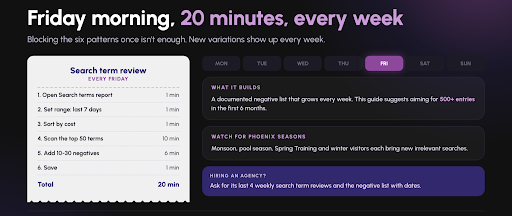
Set a recurring 20-minute slot on your calendar every Friday morning. In those 20 minutes, open the Search terms report in Google Ads. Set the date range to the last 7 days. Sort by cost. Scan the top 50 search terms. Add 10 to 30 new negative keywords based on what you see. Save. Done.
The Phoenix businesses that grow fastest on Google Ads are not the ones with the largest ad budgets.
They are the ones who commit to the 20-minute Friday habit and compound 500+ documented negative keywords over the first 6 months. That compound beats any budget increase because every dollar saved from an irrelevant click gets redirected to a real buyer.
A SEO audit shows you where your current paid and organic strategies are duplicating effort or missing search intent patterns, with three specific findings up front before you spend a dollar on rebalancing. No sales call, no credit card, three real priorities named.
That is the honest starting line in a market where most Phoenix Google Ads accounts leak money on patterns a 20-minute weekly review would catch.
Frequently Asked Questions
How many negative keywords should a mid-market Phoenix Google Ads account have after 6 months?
Typically 500 to 1,500 entries for a well-maintained account with weekly reviews. Accounts under 200 entries after 6 months are almost certainly missing patterns and wasting budget.
Which match types work best for reducing irrelevant searches in Phoenix PPC?
Phrase match and exact match for your core service terms produce dramatically fewer irrelevant searches than broad match. Broad match should be used cautiously, only after a strong negative keyword foundation is in place, and typically only on 10 to 20 percent of total keyword spend. Phoenix accounts running broad match without heavy negative keyword maintenance leak money fast because Phoenix’s dense market produces a higher ratio of adjacent-topic searches than lower-competition metros.
Should a Phoenix business add negative keywords at the campaign level or the account level?
oth, used differently. Account-level (shared) negative keyword lists work well for patterns that apply everywhere (jobs, DIY, wholesale, “free,” competitor names you never want to show against). Campaign-level negatives work for patterns specific to one campaign. Use shared lists for the 6 patterns above; use campaign-level negatives for the campaign-specific edge cases.
How do I know if my current Google Ads agency Phoenix is managing irrelevant searches well?
Ask for the last 4 weekly search term reviews and the current negative keyword list with timestamps. A credible agency will have documented weekly reviews with 10 to 30 negatives added per week and a growing list over time. An agency that cannot produce this evidence is likely adding negatives only occasionally or not at all.
How often should Phoenix seasonal patterns be reviewed in the negative keyword list?
Quarterly, aligned to Phoenix seasonal cycles. Review before monsoon season (May) to update DIY roofing and HVAC negatives, before pool season (February) to update pool DIY negatives, before Spring Training (January) to update hospitality and bar-adjacent patterns, and before winter visitor season (October) to update far-location negatives for out-of-state searches.
Can I use Google’s built-in negative keyword suggestions?
With caution. Google’s suggestions are sometimes useful but often too aggressive, blocking terms that convert for your business while missing category-specific irrelevant patterns. Use suggestions as a starting point, not a final list. A manual review of the Search terms report produces better results than relying on automated suggestions alone, especially for Phoenix-specific patterns that Google’s general suggestions do not catch.