table of Content
- 1.How to Compare SEO Services in Austin Before You Hire an SEO Agency
- 2. SEO Agency in Austin That Offers True Local Search Results
- 3. Transparent SEO Services For Austin Businesses
- 4.Local Expertise Is What Separates Austin SEO Services
- 5. Additional Factors to Consider For Best Local SEO Services in Austin
- 6.Scorecard For Your Comparison to Choose the Best SEO Agency in Austin
- 7. Final Words: Now You Know What You Need to Ask in Discovery Call
- FAQs
Key Takeaways
- Microsoft Ads management in Austin makes sense for roughly 1 in 3 Austin businesses running paid search, and the decision depends more on your specific buyer profile.
- The biggest reason to add Bing is cost per qualified lead, not reach; Microsoft Ads typically produces 20 to 50 percent cheaper clicks than Google Ads in Austin.
- The common mistake is adding Bing just because it is cheap; a cheap click on an audience that does not convert for your business still produces zero return, just more slowly.
- A credible Microsoft Advertising Austin partner walks you through the specific scenarios where Bing fits before taking a dollar, and will tell you to skip it if your buyer profile is wrong.
An Austin business owner asked a paid search question last month that gets asked more often.
“Should I be running Microsoft Ads alongside my Google Ads, or is that just something agencies pitch to add a line item to the invoice?”
The honest answer is neither.
The point of this piece is to walk through the reasoning the way an experienced Austin paid search specialist would, instead of handing you another checklist.
Microsoft Ads management in Austin is worth a real budget for some Austin businesses and a complete waste of time for others, and the decision is specific enough that no generic yes-or-no works.
The question is not whether people in Austin use Bing.
The question is whether your specific buyers do, and whether the math of reaching them is favorable for your business.
The Austin Audience Bing Actually Reaches
The U.S. Bureau of Labor Statistics data for the Austin-Round Rock-Georgetown MSA shows above-average technology, professional services, healthcare, and education employment, which produces an Austin workforce that uses both Google and Microsoft-powered search in meaningful numbers.
Before any scenario math, it helps to see who Microsoft Ads serves. The audience skews older than Google’s average, skews more desktop-heavy, tilts toward higher household income in several studies, and includes a specific B2B cluster because Microsoft Ads can layer LinkedIn professional targeting that Google Ads simply does not offer.
In Austin specifically, three audience pockets come up repeatedly.
The first is the older homeowner segment:
- Especially in Westlake, Lakeway, Barton Creek, the Arboretum area, and parts of North Austin where retired and semi-retired professionals have stayed for 15+ years.
- The second is Austin tech and healthcare professionals who use Bing at the office (because many corporate IT departments ship Edge as the default browser), even if they switch to Chrome and Google at home.
- The third is a specific B2B segment where decision-makers are reachable through LinkedIn job titles, companies, and industry targeting layered onto Microsoft search.
- A credible Microsoft Advertising Austin partner walks you through the specific scenarios where Bing fits before taking a dollar, and will tell you to skip it if your buyer profile is wrong.
None of those pockets are large enough to justify Microsoft Ads for every business. But they are specific enough that your own buyer profile decides whether any of them matter to you.
Microsoft Ads is the current name for what most people still call Bing Ads. The platform covers Bing, Yahoo, DuckDuckGo, AOL, and a syndicated partner network. Microsoft’s own advertising platform documentation reports network reach across these properties plus LinkedIn’s audience data, which is a feature Google Ads does not match.
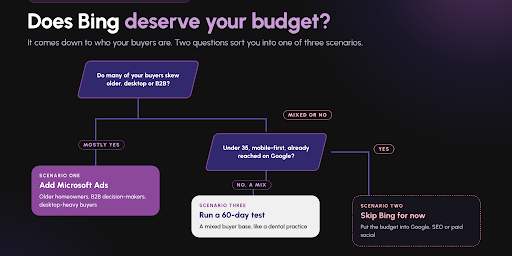
Scenario One: When Bing Belongs in Your Austin Budget
An Austin HVAC company serving Westlake, Lakeway, Barton Creek, and the northwest hills runs a Google Ads account at $8,500 per month in media, producing a cost per qualified lead of $185.
Their sales team notes that about 40% of their qualified leads come from homeowners over 55, often longtime Austin residents with established homes and higher-value service tickets.
That audience is exactly where Microsoft Ads outperforms Google.
Adding a $1,500 monthly Microsoft Ads campaign targeting the same keywords and submarkets typically produces 20 to 60 qualified leads per month at $50 to $100 CPQL.
For an HVAC business doing $15,000+ in average annual customer value, that drop produces a measurable revenue lift over 12 months.
The scenario-one businesses are the ones that match three conditions at once:
- An older buyer profile (home services targeting established homeowners, financial services, estate planning, Medicare Advantage, medical specialists serving over-55 populations, higher-end residential services).
- Austin submarkets where that profile concentrates (Westlake, Lakeway, Barton Creek, parts of North Austin, Round Rock’s established neighborhoods).
- Enough existing Google Ads data to copy a proven account structure into Microsoft Ads without starting from scratch.
If your business fits all three, Microsoft Ads is not optional.
Scenario Two: When Bing Is a Waste of Time
A buyer base that skews older than a typical e-commerce brand but younger than an HVAC business serving retirees.
An Austin dental practice with patients aged 28 to 65.
For these businesses, Microsoft Ads is a 60-day test, not a permanent line item.
The test looks like this:
- Take your top 5 to 8 best-performing Google Ads campaigns.
- Use Microsoft’s Google Ads import tool to copy the structure directly into Microsoft Ads.
- Allocate $1,000 to $2,500 per month in Bing media spend, and run it for 60 days against clear acceptance criteria.
The acceptance criteria, agreed to upfront with your Google Ads agency team, should include.
Microsoft Ads services produce at least 15 to 25 qualified leads per month at a CPQL within 25% of the Google equivalent.
The lead quality from Bing matches or exceeds Google based on sales team feedback, and the Microsoft-specific audience features produce incremental lift the Google side cannot match.
If after 60 days all three criteria are met, keep the Microsoft A ds campaign. If one or two are met, keep it but at reduced spend and tighter scope. If none are met, close it out and reinvest the budget in either your Google Ads expansion or your organic channels.
The Math That Actually Decides It
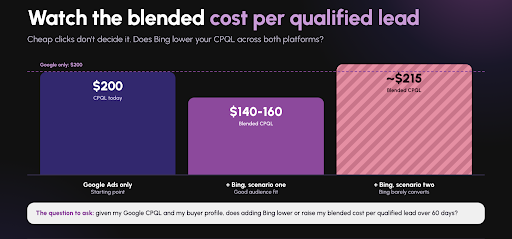
The deciding math is almost never reach; it is cost per qualified lead across the blended account.
If your Google Ads account currently runs at a $200 CPQL and your Austin buyer base matches scenario one, adding Microsoft Ads can bring blended CPQL down to $140 to $160 because the Bing clicks are cheaper and the audience fit is strong. If your Google Ads account runs at $200 CPQL and your buyer base matches scenario two, adding Microsoft Ads pushes blended CPQL up to around $215 because the Bing campaign barely converts and the extra spend gets diluted.
The CPQL math is what agency pitches almost never show. Reach numbers (Bing is 5 to 10 percent of US search volume) and CPC numbers (Bing is 30 to 50 percent cheaper than Google) look good in slides but say nothing about your specific economics. The right Microsoft Ads conversation starts with: given my existing Google CPQL, my sales team’s qualified-lead feedback by customer segment, and my Austin buyer profile, does adding Bing lower or raise my blended cost per qualified lead over 60 days? Everything else is noise.
What a Credible Microsoft Advertising Austin Setup Actually Does
If scenario one or three applies to you and you decide to run Bing, a credible Microsoft PPC Austin setup starts with a Google Ads account import to mirror what already works, then layers in Microsoft-specific features during the first 30 days.
LinkedIn professional targeting for B2B accounts, Microsoft Audience Network testing for display-adjacent reach, demographic bid adjustments weighted toward the older Austin segments where Bing outperforms Google, and device bid adjustments weighted toward desktop where Bing’s share is strongest.
Negative keyword maintenance runs the same weekly rhythm as a Google account. Conversion tracking integrates with the same CRM so lead quality reports cover both platforms in a single view.
The Microsoft Ads results get folded into the same monthly report as Google Ads with a direct comparison of CPQL, qualified lead rate, and revenue per dollar spent per platform, so the ongoing decision to keep or cut the Bing budget stays grounded in data.
Austin seasonal context applies to Bing campaigns the same way it applies to Google; schedule budget around the same peaks.
What ROILift Does for Austin Microsoft Ads Engagements
ROILift walks every Austin business through the three scenarios above before taking a Microsoft Ads engagement, and declines Bing work for businesses that clearly fit scenario two.
For scenario one and three businesses, we run the 60-day test with written acceptance criteria, report CPQL side by side with existing Google Ads data, and roll the account into standing management only after it earns its place.
Frequently Asked Questions
Is Microsoft Ads the same thing as Bing Ads?
Yes. Microsoft renamed the platform in 2019. The ads still show on Bing, plus Yahoo, DuckDuckGo, AOL, and a syndicated partner network. For Austin businesses, “Microsoft Ads” and “Bing Ads” refer to the same platform, though the reach has expanded over time to include Microsoft-owned properties beyond Bing itself.
Can I just copy my Google Ads campaigns into Microsoft Ads and expect them to work?
Microsoft’s Google Ads import tool copies keywords, ads, structure, and basic targeting cleanly, which saves 10 to 20 hours of setup time. But the audience behaves differently (older, more desktop, less mobile), the auction dynamics are different (less competition, lower CPCs), and some Microsoft-specific features (LinkedIn targeting, Audience Network) do not have Google equivalents. Expect to spend the first 30 days after import tuning bids, adding Microsoft-specific audiences, and adjusting negative keywords for Bing-specific search patterns.
What budget should an Austin small business start with on Microsoft Ads?
$1,000 to $2,500 per month in media spend for the 60-day test. Below $1,000, Microsoft Ads does not accumulate enough daily data to produce meaningful signal within 60 days. Above $2,500 at the test stage is premature; you have not yet confirmed the account works. After the 60-day test, successful scenario-one Austin accounts typically grow Microsoft Ads to 15 to 25 percent of their total paid search spend.
How does LinkedIn targeting through Microsoft Ads actually work?
Microsoft Ads lets you layer LinkedIn’s professional data (job title, company, industry, company size) on top of your Bing search campaigns. For Austin B2B businesses selling to specific decision-maker profiles, this unlocks targeting precision Google Ads cannot match. The feature typically justifies the Microsoft Ads investment on its own for B2B businesses with well-defined ICPs.
Does Microsoft Ads work for Spanish-language Austin audiences?
Less reliably than Google. Spanish-language search in Austin (serving East Austin, parts of South Austin, specific neighborhoods with Spanish-speaking populations) runs primarily on Google and mobile devices, which is Bing’s weakest segment. If Spanish-language ad coverage is a meaningful part of your Austin strategy, Google Ads remains the primary platform. Microsoft Ads English-language campaigns can still produce value for the same Austin business, just not for the Spanish-language portion.
How much does Microsoft Ads management cost compared to Google Ads management in Austin?
Management fees typically run similar percentages on a smaller base: 15 to 25 percent of Microsoft Ads media spend, or $500 to $1,500 flat monthly for small Microsoft Ads accounts added to existing Google Ads retainers. Because the Bing budget is usually 15 to 25 percent of the Google budget, the Microsoft Ads management fee is proportionally smaller in absolute dollars. The 60-day test typically runs $500 to $2,000 in management time plus the $2,000 to $5,000 in media spend.