table of Content
- 1.How to Compare SEO Services in Austin Before You Hire an SEO Agency
- 2. SEO Agency in Austin That Offers True Local Search Results
- 3. Transparent SEO Services For Austin Businesses
- 4.Local Expertise Is What Separates Austin SEO Services
- 5. Additional Factors to Consider For Best Local SEO Services in Austin
- 6.Scorecard For Your Comparison to Choose the Best SEO Agency in Austin
- 7. Final Words: Now You Know What You Need to Ask in Discovery Call
- FAQs
Key Takeaways
- PPC management services in Phoenix waste 20 to 50 percent of a typical small business ad budget in 6 common spots.
- The biggest leak is usually broad match keywords running without enough negative keywords, which sends your ads to searches that have nothing to do with your business.
- The common mistake is judging a Phoenix PPC account on total clicks and conversions instead of on cost per real customer; the first number can look fine while the second keeps rising.
Most Phoenix small businesses that run Google Ads are leaking budget in places they cannot see.
The monthly report says the account is fine; clicks are coming in. Conversions are happening.
But if you compared the money going out against the real customers coming in, you would find a gap. That gap is where the leaks live.
Here are the 6 most common places Phoenix PPC budgets leak, in plain language, with a quick test you can run yourself and a fix for each.
What Are The 6 Leaks That PPC Management Services In Phoenix Flags?
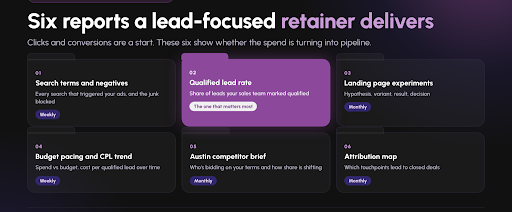
The job of a good PPC management services provider in Phoenix is to find and fix those leaks one by one, not just to keep the account running.
Phoenix is a tough PPC market because a lot of businesses compete for the same local searches. The market consists of HVAC and skilled trades employment well above the national average, which means lots of plumbers, roofers, and contractors bidding for the same keywords.
Competition pushes cost per click up, which means leaky accounts waste money faster in Phoenix than they do in slower markets. Google Ads Help documentation on account structure confirms that keyword match type, targeting, and audience settings are where most budget decisions get made, and where most of them go wrong.
The 6 biggest leaks consist of:
Leak 1: Broad Match Keywords Running Wild
What it means in plain words:
“Broad match” is a Google Ads setting that lets your ad show up for searches related to your keyword, not just the exact keyword. It sounds helpful. It usually is not.
How the leak happens:
You bid on “AC repair Scottsdale” with broad match, and Google shows your ad to someone searching “how to fix an AC capacitor yourself” or “cheapest AC filter brand.” Those people are not buyers. They click anyway. You pay anyway.
How to check it:
Open your Google Ads account, go to the “Search terms” report, and look at what people actually searched before clicking your ad.
If more than 20 to 30 percent of the searches are unrelated to your business, broad match is leaking budget.
The fix:
Switch broad match keywords to phrase match or exact match for your core service terms. Build a long list of negative keywords (searches you do NOT want your ad to show for).
Review that list every week for the first 90 days and add 10 to 30 new negatives per review.
Leak 2: Location Targeting Set to “Interest” Instead of “Presence”
What it means in plain words:
Google Ads has two location targeting options. “Presence” shows your ad only to people physically in the location you choose. “Presence or interest” shows your ad to anyone searching for your location, even if they live in another state.
The second option is the default. It is also the wrong choice for most Phoenix small businesses.
How the leak happens:
You set your Phoenix SEO HVAC to show in “Phoenix, Arizona.” A homeowner in Minnesota searches “best AC in Phoenix” to research a vacation rental. Google shows your presence. You pay for the visibility. They never become a customer.
How to check it:
In Google Ads, go to the campaign settings, click “Locations,” then look for “Location options.” If the setting says “Presence or interest,” that is the leak.
The fix:
Change the setting to “Presence (People in or regularly in your targeted locations).” This usually cuts out 10 to 20 percent of wasted spend immediately.
If your business serves specific Phoenix submarkets, target those submarkets individually with bid adjustments, so you pay more where you want to compete and less where you do not.
Leak 3: Mobile Bid Adjustments Missing
What it means in plain words:
In Phoenix, most local service searches happen on phones, not desktops. Phoenix buyers over 50 call directly from the search results page.
Phoenix buyers under 40 fill out forms on their phones. Either way, mobile is where the money is. But most accounts never set a separate bid for mobile.
How the leak happens:
Your account bids the same amount for a mobile click as a desktop click, even though mobile clicks convert at a different rate for your business. You either overpay for mobile or underpay and lose top position, which means you lose calls.
How to check it:
Go to “Devices” inside a campaign. Compare the cost per conversion for mobile vs desktop vs tablet. If mobile converts 2x better than desktop and the bids are the same, you are underbidding on your best channel.
The fix:
Set a mobile bid adjustment of +10 to +30 percent on campaigns where mobile outperforms. Set a tablet bid adjustment of -30 to -50 percent on campaigns where tablet underperforms. Check and adjust every 60 days.
Leak 4: Audience Exclusions Not Set
What it means in plain words:
Google Ads lets you exclude certain audiences from seeing your ads. “People who already converted on your site in the last 30 days.” “Job seekers.” “People from outside your service area.”
Most Phoenix accounts have zero audience exclusions set up.
That means your ads show to people who will never become customers.
How the leak happens:
A job seeker searches “HVAC companies hiring in Phoenix.” Your HVAC service page shows up; they click, you pay. A past customer who already has an appointment booked clicks your ad again. You pay again.
How to check it:
In Google Ads, go to “Audiences” at the campaign level. Look at the “Exclusions” tab. If it is empty, that is the leak.
The fix:
At minimum, exclude your “all converters” list, your past customer list (uploaded from your CRM), and any job-seeker audience Google provides.
For Phoenix businesses with strong brand searches, also exclude your own brand searchers from your non-brand campaigns so you do not pay to compete against yourself.
Leak 5: Landing Pages That Do Not Match the Ad
What it means in plain words:
If your ad says “AC repair in 60 minutes” and the landing page talks about your 30 years of experience, your service area, and your family values, the visitor bounces.
How the leak happens:
The agency builds one generic landing page for all ads. That page does fine on 1 or 2 ad groups and poorly on the rest. Spend keeps going to the poorly-matching ad groups because conversion data is measured in total, not per ad group.
How to check it:
Look at your landing page conversion rate per ad group. If one ad group converts at 8 percent and another converts at 1.2 percent on the same landing page, the landing page is wrong for the second ad group.
The fix:
Build a dedicated landing page per campaign or ad group. The headline on the page should match the headline in the ad. The first section should address the specific service and specific Phoenix submarket, not your general story.
A credible SEO service in Phoenix and content partner can help you build matching landing pages that both rank organically and convert paid traffic.
Leak 6: Negative Keywords Never Updated
What it means in plain words:
Negative keywords tell Google what searches to NOT show your ad for. Every account needs a growing list of negative keywords, added every week based on the search terms your ads are actually appearing for. Most accounts stop maintaining this list after the first month.
How the leak happens:
A Phoenix plumber account has negative keywords for “DIY” and “parts” and “jobs.” Every week, more junk searches trigger the ads. Every week, more budget leaks.
How to check it:
Go to the “Search terms” report in Google Ads. Set the date range to the last 30 days.
Count how many searches are not relevant to your business. If more than 15 percent of searches are irrelevant and the negative keyword list has not been updated in the last month, this is the leak.
The fix:
Commit to a weekly negative keyword review for the first 90 days of the account, and a monthly review after that.
Maintain a shared list of negatives across campaigns, and create campaign-specific negatives where one campaign should not show for terms another campaign is targeting.
The 5-Minute Check You Can Run Right Now
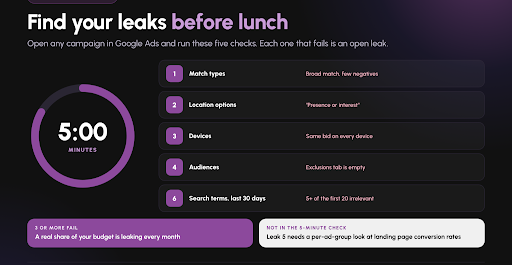
Open your Google Ads account. Click on any campaign. Then:
- Look at the match types used. Any broad match without strict negative keyword lists is leak #1.
- Check location targeting options. If it says “Presence or interest,” that is leak #2.
- Click “Devices.” If mobile and desktop bids are the same, that is leak #3.
- Click “Audiences” and look for exclusions. If none exist, that is leak #4.
- Open the “Search terms” report for the last 30 days. Count the first 20 searches. If more than 5 look irrelevant, that is leak #6.
Five minutes. If 3 or more of those checks fail, your Phoenix PPC budget is leaking at least 15 to 25 percent of its spend every month. Pair this check with an SEO audit, and you will see where paid and organic together are losing money that should be coming back as real leads.
The 15 Minutes That Pay For Themselves
Set a timer for 15 minutes. Run the 5-minute check above. Count the leaks you found. Then open your bank statement from last month and look at what you spent on Google Ads. Multiply that number by 20 percent. That is roughly what the leaks cost you last month, every month, until they get fixed.
The Phoenix small businesses that grow the fastest on paid search are not the ones with the biggest budgets.
They are the ones whose budget actually reaches real customers because the leaks get sealed before every month starts.
Six leaks, fifteen minutes to find them, a credible provider to fix them. That is the honest starting line when the goal is real customers, not inflated click counts.
Frequently Asked Questions
How can a Phoenix small business tell if its current PPC agency is managing leaks or ignoring them?
Ask for the last 4 weekly search term reports and the running negative keyword list. If the agency cannot produce weekly search term reviews or the negative keyword list has fewer than 100 entries after 90 days of the account running, leak #1 and leak #6 are being ignored. Those two account for most wasted Phoenix PPC spend.
How much do these 6 leaks typically cost a Phoenix small business per month?
A typical Phoenix small business runs $2,000 to $5,000 per month on Google Ads.
Does Performance Max solve any of these leaks, or create more?
Performance Max handles some leaks (automated audience exclusions, some device bidding) and creates others. For most Phoenix small businesses in lead-generation categories, standard search campaigns with careful leak management produce better qualified lead rates than Performance Max alone.
What is the minimum monthly budget for PPC services Phoenix businesses need to make a Phoenix PPC account worth running?
$2,000 per month in media spend is the practical minimum for competitive Phoenix service categories. Below that, Google Ads does not accumulate enough daily data to run meaningful tests. Businesses with budgets below $2,000 per month often get better returns from local SEO services first, then adding paid as the organic foundation stabilizes.
How long does it take to fix all 6 leaks in a Phoenix PPC account?
Expect the simple leaks to be fixed within the first week. Match type restructuring and negative keyword building take 4 to 8 weeks of weekly review. Landing page testing takes 8 to 12 weeks to produce statistically meaningful results. Full cleanup across all 6 leaks typically completes in 60 to 90 days, with ongoing maintenance afterward.
Can a Phoenix small business fix these leaks in-house without hiring a PPC agency Phoenix providers offer?
Yes, with 8 to 15 hours of monthly dedicated time and someone comfortable with Google Ads account structure. The 5-minute check above identifies which leaks exist; the fixes take longer to implement correctly. Most Phoenix small businesses outsource because the hours compound against sales and operational work, and because keeping up with weekly negative keyword review and landing page testing is where in-house efforts usually stall.