table of Content
- 1.How to Compare SEO Services in Austin Before You Hire an SEO Agency
- 2. SEO Agency in Austin That Offers True Local Search Results
- 3. Transparent SEO Services For Austin Businesses
- 4.Local Expertise Is What Separates Austin SEO Services
- 5. Additional Factors to Consider For Best Local SEO Services in Austin
- 6.Scorecard For Your Comparison to Choose the Best SEO Agency in Austin
- 7. Final Words: Now You Know What You Need to Ask in Discovery Call
- FAQs
Key Takeaways
- SEO migration services in Austin exist because website rebuilds routinely destroy 30 to 70% of organic traffic.
- The biggest lever is pre-migration asset inventory: catalog every ranking page, every high-value backlink, every schema block, every internal link path, and every tracked keyword before the first wireframe gets drawn.
- The common mistake is letting the design team or development team lead the migration; they optimize for aesthetics and code quality, which are different problems from preserving the SEO equity that took years to build.
Austin businesses that pay for a website redesign and then watch their rankings collapse are usually not victims of bad luck.
They are victims of a poorly mapped, predictable sequence.
The design agency promised a modern site, the developer rebuilt from scratch, nobody mapped the old URLs to the new ones, nobody preserved the schema, and the first month after launch produced a 40% traffic drop that took 9 months to recover.
The significance of SEO migration is to exactly tackle this problem and tackle the quarterly loss.
Here are five migration failure modes that destroy Austin website rankings.
Why SEO Migration Services in Austin Make Sense?
Because an Austin service business that loses organic traffic does not come back automatically once rankings recover.
Austin is a rebuild-heavy market because the metro has a high tech-adjacent business concentration.
The U.S. Bureau of Labor Statistics data for the Austin-Round Rock-Georgetown MSA shows above-average professional services, creative, and tech employment, which produces a constant flow of agencies pitching Austin businesses on redesigns.
The Austin competitive environment punishes slow recovery harder than most metros because competitors move in quickly on any ranking drop.
And the real symptom each one produces, what actually causes it, and the specific protection a credible SEO migration services plan builds before any rebuild work begins.
Failure Mode 1: The 301 Redirect Gap
30 to 60 days after launch, Google Search Console shows a surge of 404 errors, rankings drop across multiple priority pages, and organic traffic falls between 30 and 50%.
This happens because old URLs did not get 301-redirected to new URLs. Either the redirects were never built, were built incorrectly, chained through multiple hops, or missed specific URL patterns like category pages, parameter URLs, or legacy blog archives.
What to protect before the rebuild?
Export every URL from the current site that has earned either organic traffic or a backlink in the last 24 months.
Data from Google Search Console, Google Analytics, or GA4 helps you with deciding the which URLs to focus on.
Any URL without a direct equivalent gets a decision: redirect to the closest topical match, redirect to the parent category, or 410 (gone) for truly obsolete pages. The map becomes a 301 redirect file the developer implements before launch, verified with a test crawl before DNS changes over.
Failure Mode 2: The Content Depth Downgrade
Rankings hold for the first 30 days (because 301s were done correctly), then start declining gradually over months 2 through 6 across pages that lost content substance in the rebuild.
The design team shortened pages to fit the new aesthetic.
A page that used to have 2,400 words of substantive content became a 600-word version just to follow a “modern, clean” version.
Google’s helpful content system eventually notices the drop in topical depth, and rankings erode on queries where the longer version used to be the comprehensive answer.
What to protect before the rebuild?
Redesign the website based on the content and not vice versa.
For each page, document: word count, the H2 and H3 structure, any tables or lists, any FAQ schema, and any specific examples or case studies the page contains.
The new design must accommodate this content density, not require it to be cut. If specific sections genuinely need to move elsewhere, those destinations also need to be mapped.
Failure Mode 3: The Schema and Structured Data Loss
AI Overview citations and featured snippet appearances disappear within 60 days of launch, even when traditional rankings hold.
Mobile click-through rate drops. Specific page types (FAQ pages, review pages, service pages) lose rich results in Google.
The rebuild used a new CMS, theme, or framework that did not carry over the structured data markup from the old site.
LocalBusiness, Service, FAQPage, Review, Author, Article, and Organization schema either never got reimplemented, got implemented incorrectly, or got implemented with stripped-down properties missing from the original. AI engines that were citing the old site cannot extract the same entity signals from the new site.
What to protect before the rebuild?
Export every schema block from the old site using Google’s Rich Results Test on each ranking page. This is what a credible SEO partner would do and one of the finest benchmarks to compare SEO companies in Austin.
The rebuild spec must include a schema implementation checklist naming the exact schema types and properties per page template.
Validation happens before launch using the Rich Results Test again, confirming every schema block the old site had, the new site has.
What Separates Austin SEO Migration From Generic Plans
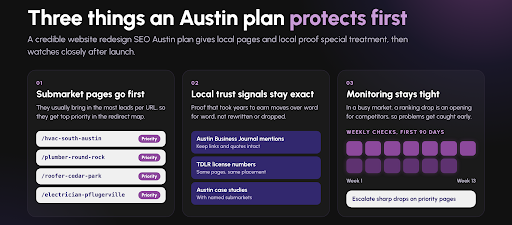
Three specifics belong on every Austin migration project a credible website redesign SEO Austin provider runs:
- Named Austin submarket pages get specific migration priority because submarket pages typically produce the highest lead volume per URL.
- Austin-specific trust signals get preserved exactly (Austin Business Journal mentions, Texas Department of Licensing and Regulation license numbers, specific Austin client case studies with named submarkets).
- Austin SEO services monitoring during the migration window stays tight because the competitive density of the Austin market means lost rankings get claimed by competitors within 30 to 60 days, not 6 months as in slower metros.
What Your Current Rebuild Plan Is Risking
If your current redesign plan has no SEO plan, your ranking equity is unprotected.
Which means the first 60 days after launch will cost you traffic you cannot immediately replace. If the plan has an SEO section that says “we will handle redirects,” that is not a protection plan; that is one failure mode out of five.
The Austin businesses that come through rebuilds without losing rankings are not the ones with the best designers.
They are the ones with a documented pre-migration audit, a redirect map, a schema catalog, an internal link spec, and a post-launch monitoring plan, all built before the first page was redesigned.
SEO audit shows you exactly which of your current ranking pages are at risk, which schema blocks and internal links are load-bearing, and which pages must survive the rebuild intact.
Three specific protections named up front, no sales call, no credit card. That is the honest starting line in a market where lost rankings get claimed by competitors within 60 days.
Frequently Asked Questions
How much traffic does a typical Austin business lose during a website redesign without SEO migration services?
It’s evident that businesses that rebuild without SEO protection typically lose 30 to 70% of organic traffic. Recovery timelines range from 4 months to never (for domain moves that lost significant authority). Austin’s competitive density compresses recovery windows because competitors move in on lost rankings within 30 to 60 days.
Can a website redesign SEO Austin provider work alongside the design agency and development team?
Yes, and it is the only way migrations succeed. The SEO provider produces the pre-migration audit and the technical migration spec. The design agency and development team then build against that spec. Each team handles its own expertise. Design handles aesthetics and user experience, development handles performance and code quality, SEO handles ranking preservation. The migration fails when design or development overrides SEO specs for aesthetic reasons without flagging the tradeoff first.
What is the minimum timeline for a credible SEO migration on an Austin business website?
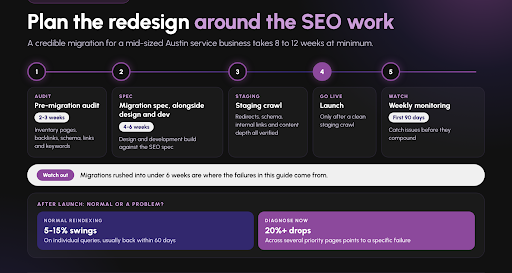
At minimum, 8 to 12 weeks for a mid-sized Austin service business, split as: 2 to 3 weeks pre-migration audit, 4 to 6 weeks parallel to design and development for migration spec preparation. Rushed migrations under 6 weeks total consistently produce the failures above. The business should plan the redesign timeline around the SEO migration window, not the other way around.
Should SEO migration Austin plans include staging site testing before launch?
Yes, always. The staging site is where every migration failure above can be caught before it hits live traffic. The staging site crawl should confirm that all redirects are functional, all schema is implemented correctly, all internal links are in place, and all content is preserved at the expected depth. Launching to production without a verified staging crawl is where most migration failures originate.
What happens if rankings drop despite a well-executed SEO migration?
Some ranking fluctuation is normal in the first 30 to 60 days post-launch as Google reindexes the new structure. Fluctuations of 5 to 15% on individual queries are common and typically recover within 60 days. Drops of 20% or more across multiple priority pages signal a specific migration failure that needs diagnosis. A credible website migration SEO Austin provider monitors weekly for the first 90 days specifically to catch these issues before they compound.
How much does SEO migration cost for a typical Austin business site?
Austin migration projects typically run between $8,000 and $35,000 depending on site size and timeline flexibility. Emergency recovery after a failed migration usually costs 2 to 4 times the original migration budget would have cost because the work includes diagnosing failures. The cost comparison that matters is total cost of migration plus recovery versus total cost of proactive migration services.