table of Content
- 1.How to Compare SEO Services in Austin Before You Hire an SEO Agency
- 2. SEO Agency in Austin That Offers True Local Search Results
- 3. Transparent SEO Services For Austin Businesses
- 4.Local Expertise Is What Separates Austin SEO Services
- 5. Additional Factors to Consider For Best Local SEO Services in Austin
- 6.Scorecard For Your Comparison to Choose the Best SEO Agency in Austin
- 7. Final Words: Now You Know What You Need to Ask in Discovery Call
- FAQs
Key Takeaways
- Google Ads management in Austin accounts should pass specific readiness tests before any budget increase.
- The biggest lever is the cost-per-qualified-lead stability test, because an account that has not held its CPL steady for 60 days.
- The common mistake is raising the budget because the previous month looked good.
- A credible Google Ads agency Austin businesses hire tests all 5 readiness points before recommending a budget increase, and will push back on scaling an account that fails any of the 5.
Most Austin businesses raise their Google Ads budget at the wrong time. Something good happens in the account: a lead comes in, a competitor pauses, a landing page finally converts.
The owner or marketing lead feels good about the performance and tells the agency to push more budget. Three months later, the spend has doubled, and the qualified lead count is up 20 percent instead of 100 percent.
The account was not ready for the scale. The money got spent anyway.
Why Scaling Google Ads Services in Austin Too Early Can Cost More Than It Delivers?
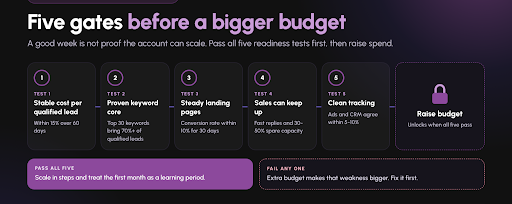
The point of a disciplined Google Ads management in Austin approach is to test the account’s readiness before the budget conversation.
Allowing you to scale only when scaling actually works, because Austin is a competitive paid search market.
The U.S. Bureau of Labor Statistics data for the Austin-Round Rock-Georgetown MSA shows above-average technology, professional services, and healthcare employment, which pushes CPCs higher than most US metros.
If any of those are weak at your current budget, adding budget amplifies the weakness.
Here are the 5 readiness tests your Austin Google Ads account should pass before you raise the budget, with the threshold for each and what breaks if you scale without passing it.
Test 1: The Cost-Per-Qualified-Lead Stability Test
What it checks:
Has your Google Ads service cost per qualified lead (not conversion count, qualified lead) stayed stable within 15 percent for the last 60 days?
How to run it?
Pull your monthly cost per qualified lead for the last 3 months. Divide the highest number by the lowest. If the ratio is 1.15 or lower, the account is stable. If the ratio is higher, the account is volatile.
Threshold to pass:
Current CPL is within 15 percent of the 60-day average, and the trend is flat or improving (not getting worse month over month).
Before scaling, tighten match types on your top-spending keywords, and add 50 to 100 new negative keywords.
Pause ad groups that produce under 2 qualified leads per month, and give the account 30 more days of stability data before deciding on the budget increase.
Test 2: The Keyword Concentration Test
What it checks:
Are 70 percent or more of your qualified leads coming from a core set of 20 to 30 keywords with proven performance?
How to run it?
Sort your conversion data by keyword. Look at the top 30 keywords by qualified lead count. Calculate what percentage of total qualified leads those 30 keywords produced.
If it is 70 percent or higher, you have a proven core. If it is lower, you have a scattered account.
Threshold to pass:
Top 30 keywords produce 70 percent or more of qualified leads, and those keywords have each produced at least 5 qualified leads in the last 90 days (enough data to trust them).
Restructure the account around the proven top 30 keywords. Pause or heavily deprioritize the long tail. Scale only after the core is clearly identified.
Test 3: The Landing Page Conversion Test
What it checks:
Has your landing page conversion rate held stable or improved for 30+ days at the current traffic level?
How to run it?
Check your conversion rate per landing page in Google Ads or your analytics tool over the last 30 days.
Compare it to the previous 30 days.
If conversion rate is stable or climbing and visit volume has been steady, the landing page is working at current scale.
Threshold to pass:
Conversion rate stable within 10 percent for 30 days, with at least 500 unique visitors per month to each priority landing page (enough traffic to trust the number).
More traffic will hit the same leaky landing page. The extra clicks produce extra bounces, not extra leads.
Austin SEO services and PPC should share landing pages where possible, because a page that ranks organically and converts well is usually a page that also converts well for paid traffic.
The same page quality signals that drive conversion rate also drive whether AI engines pull your business into category answers.
A page that is already set up to get your local business mentioned in AI answers is usually the same page that converts well for paid traffic, so fixing one lifts both.
Test 4: The Sales Capacity Test
What it checks:
Can your sales team handle 50 percent more leads next month without their response time getting worse?
How to run it?
Look at the current average response time from lead to first contact. If that number is already stretched (over 4 hours during business hours, over 24 hours outside), adding more leads will make it worse.
Threshold to pass:
Current response time under 1 hour during business hours, under 12 hours outside business hours, and the sales team confirms they have 30 to 50 percent capacity headroom.
Before scaling the ad budget, either grow the sales team, implement an automated response system, improve lead routing, or build a nurture sequence.
Test 5: The Infrastructure Test
What it checks:
Are your conversion tracking, CRM integration, and attribution set up cleanly enough that you will be able to tell if scaling worked?
How to run it?
Check 5 items:
- Conversion tracking is firing on every real lead action (not accidental clicks).
- Your CRM is receiving every lead with source tags.
- Sales outcomes are flowing back into Google Ads via enhanced conversions or offline conversion imports.
- Attribution is set to data-driven or a model that reflects your actual buyer journey.
- All tracking is in place for the categories where calls are a primary lead source.
Threshold to pass:
All 5 items are functioning, and the latest month of data shows tracked leads matching your CRM records within 5 to 10 percent.
Before scaling, run a one-week audit of all tracking, CRM, and attribution systems.
Fix anything broken. Confirm the numbers reconcile between Google Ads and your CRM. Then scale, with the first month treated as a learning period to confirm the extra spend is being measured correctly.
The One Test That Fails Most Austin Accounts
Marketing teams scale PPC budgets without asking the sales team if they can handle the extra leads.
Three months later, the close rate has dropped, the sales team is complaining about unqualified leads, and the PPC agency is being blamed for a problem that is really a capacity problem.
Before scaling, have the conversation with your sales team. Not a one-line check-in.
A real conversation about response times, workload, nurture sequences, and current close rate. If any of those are strained, fix them first.
What Austin Specifics Matter Before Scaling
Three Austin signals belong in every Google PPC Austin scaling conversation:
- Named Austin submarkets in geo-targeting and bid adjustments, with per-submarket performance data informing where the extra budget actually goes.
- Austin seasonal demand patterns factored into scaling timing, because scaling budget at a seasonal demand peak produces different unit economics than scaling in a flat month.
- Spanish-language ad coverage for applicable categories serving East Austin and specific Austin neighborhoods with Spanish-speaking populations, because scaling only the English-language side leaves half the market underserved.
Pair Google Ads scaling with Austin SEO services so paid and organic share query data.
What ROILift Does for Austin Google Ads Retainers
ROILift runs all 5 readiness tests before any budget increase recommendation on a Google Ads management in Austin retainer.
If the account fails any test, we document the specific fix needed and the expected timeline to pass, and we delay the scaling conversation until the account is ready. Clients get the honest answer, which is usually “fix this one thing first” rather than “yes, let’s spend more now.”
Pricing is published. No scaling work begins without a written baseline, a documented readiness result on each of the 5 tests, and a target cost per qualified lead after scaling.
Frequently Asked Questions
How often should I consider raising my Austin Google Ads budget?
No more than once every 60 to 90 days, in increases of 25 to 50 percent at a time. Jumping budget by 100 percent or more in a single step shocks Google’s bidding algorithms, which often take 30 to 60 days to recalibrate. During that recalibration window, your cost per lead typically climbs 20 to 40 percent before stabilizing. Smaller, more frequent increases let the algorithm adjust without the shock, which produces more predictable scaling returns.
What is a healthy cost per qualified lead for a Google Ads services Austin account in competitive categories?
Austin HVAC and plumbing typically run $75 to $200 per qualified lead. Legal services run $150 to $500. Medical and dental run $100 to $300. B2B professional services run $250 to $800. The right number for your business is the one where lifetime customer value exceeds the fully-loaded acquisition cost.
Can I scale my Austin Google Ads budget during Austin’s peak seasonal events like SXSW or ACL?
Technical SEO, on-page optimization, content production, link building, Google Business Profile management, review generation, local citations, keyword tracking, and a named account manager. Fewer than these line items in writing is a thin scope. Ask for each line to carry hours or output volume before signing.
How do I handle an existing Google Ads account that my previous agency scaled too aggressively?
Pause scaling, run the 5 readiness tests above, identify which ones fail, and roll the budget back to the level where the account was last stable. Rebuild from that stable base with the readiness fixes applied. Most over-scaled Austin accounts need 60 to 120 days of controlled contraction before resuming scaling can make sense.
Should I use Performance Max as part of scaling my Austin account?
Performance Max can add incremental volume once your underlying search account passes the 5 tests, but it should not be the vehicle for primary scaling in most lead-generation categories. Performance Max gives less control over search term quality and often produces lower qualified lead rates than well-managed search campaigns. For Austin service businesses, standard search campaigns scaled thoughtfully typically outperform Performance Max expansions during the first 6 to 9 months.
How long after scaling should I expect to see results stabilize?
30 to 60 days for the new budget level’s cost per qualified lead to stabilize, 60 to 90 days for Google’s bidding algorithms to fully recalibrate, and 90 to 120 days for the scaled account’s overall performance picture to be measurable.